
The piano roll: read and correct notes
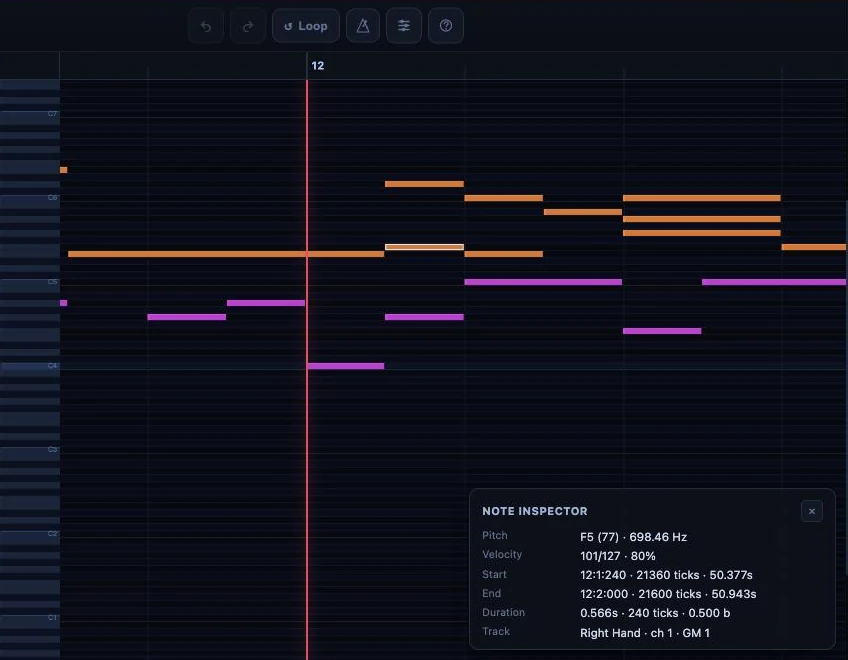
The piano roll displays your music as blocks on a grid: time from left to right, pitch from bottom to top, duration in the length of the block. You use it to listen to a transcription again and to correct notes precisely.
Where do I find the piano roll?
On your sheet music page, choose the Piano roll or Both view in the selector. To correct notes, click Edit, then In the piano roll. See Read and listen to your sheet music.
Piano Roll or Vertical: which view?
The piano roll has two views, which you switch at the top of the screen.
- Piano Roll: the precise correction view.
- Vertical: to follow the song on screen and spot the passage that bothers you.
The simplest method: correct in Piano Roll, check in Vertical, and go back to Piano Roll if needed.
How do I listen and move around?
Play and pause with the button or the space bar. Click the progress bar to jump to a passage. The S key goes back to the start, M turns the metronome on, F switches to full screen.
For a fast passage, lower the playback speed to 0.5×: rhythm shifts are easier to hear.
How do I repeat a passage?
Turn on the Loop (A/B loop): the piano roll continuously replays the chosen area, so you can listen to the same measure again after each correction. On the keyboard, [ and ] set the start A and the end B, and L turns the loop on or off.
How do I correct a note?
- First zoom in on the passage (− and + buttons, or a two-finger pinch on a phone): in tight areas, this keeps you from selecting the wrong note.
- Click the note to select it.
- Drag it to change its timing or its pitch.
- Pull its left or right edge to adjust its duration.
- Listen again.
To create a note, double-click an empty area (or long-press on a phone). To delete it, press Delete or Backspace, or right-click then choose Delete.
On a phone, tap a note: four arrows appear under the grid to move it step by step, in time (left, right) or in pitch (up, down).
What other settings are there?
- Tracks: each instrument has its own track, with mute, solo, volume and pan, to isolate the source of a mistake. Double-click the name to rename it.
- Transpose: shifts all the notes by semitones.
- Undo and redo: Cmd/Ctrl + Z; you can experiment safely.
- Help: the question mark opens the built-in help with the shortcuts.
Fix with Chopy
In edit mode, ask Chopy for the fix in one sentence: “quantize measures 1 to 8 to sixteenth notes”, “crescendo from measure 9 to 12”, “pedal on every measure”. Chopy can do everything you would do by hand in the piano roll, and a request is undone in a single step.
Chopy also answers your questions about the MIDI, without switching the piano roll to Edit mode: “Which track is the hardest to play?”, “Where does the dynamics change?”. See Ask Chopy a question.
Are my corrections saved?
Yes, automatically. An indicator shows the status: "Ready", "Saving...", "Saved" or "Save error". When it says "Saved", your latest corrections, yours and Chopy's, are used to regenerate the sheet music and the MusicXML you download. Conversely, a correction saved in the sheet music editor updates the piano roll: the two stay in sync. If there is an error, make a small test correction and wait for it to return to "Saved"; if it persists, reload the page.
Was this article helpful?
In the same topic
Ready to try it?
Turn your songs into sheet music and MIDI files with the La Touche Musicale apps in the HUB.