
How does the PianoGo song catalog work?
The PianoGo catalog gathers free songs and Premium songs, sorted by genre and difficulty. Here is how to find the one that suits you.
How many songs does it contain?
As of 2026-11-08: 257 free songs and 2,711 Premium songs.
On a song page, PianoGo shows whether it is included in the free catalog or reserved for Premium.
How do I search for a song?
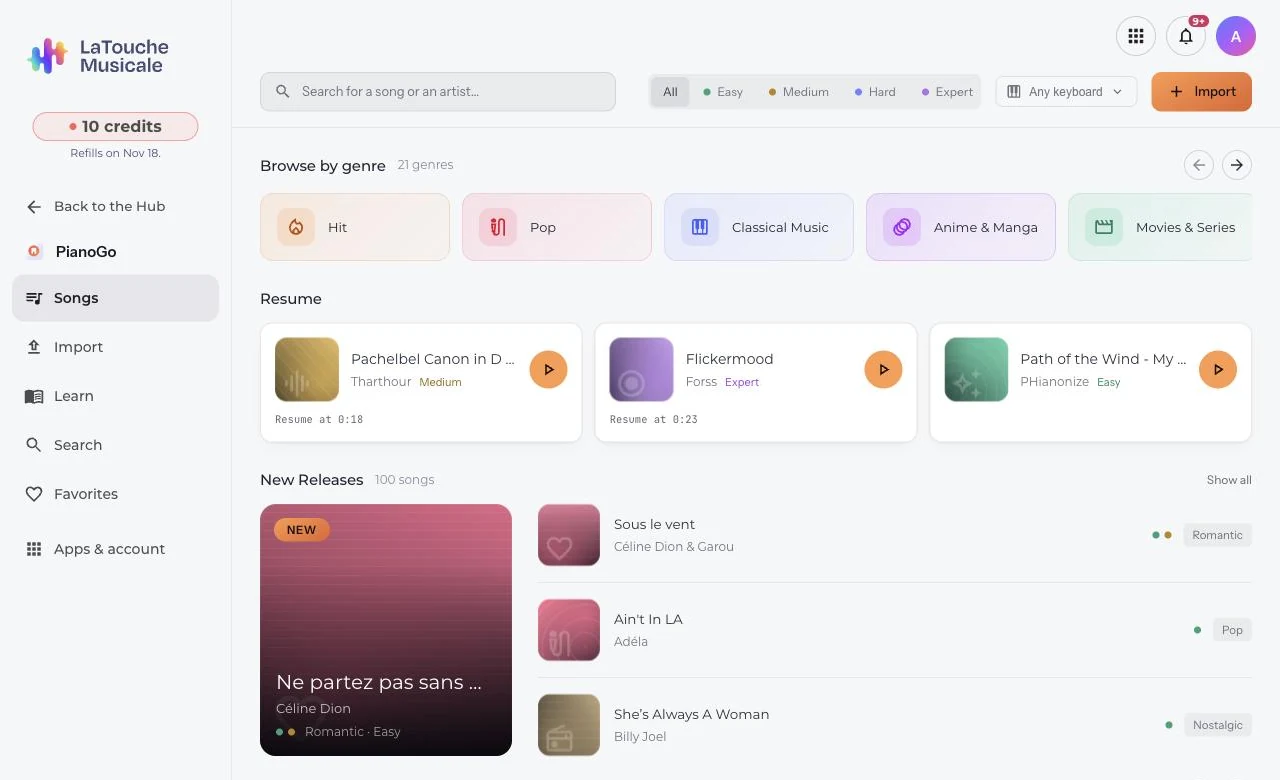
- Browse by genre, or use search: a title, an artist.
- Filter by difficulty.
- Open the song page, then choose the level of the song.
If you can't find a title, PianoGo offers to let you import it yourself (see importing a song).
How do I see only the songs playable on my keyboard?
The "Playable on my keyboard" filter shows only the songs whose notes all fit on your keyboard. Enter the number of keys on your piano. On a song page, PianoGo also states whether the song fits your keyboard.
How do I find my songs again?
- The heart on a song page adds the song to your favorites.
- You then find your liked songs, the ones you worked on recently with their progress, and your imported songs.
- Removing a song from your favorites or history erases your progress on that song; it stays in the catalog.
Deleting an imported song is permanent: the MIDI file and the progress are deleted.
Was this article helpful?
In the same topic
Ready to try it?
Turn your songs into sheet music and MIDI files with the La Touche Musicale apps in the HUB.