
How do you import a MIDI file into PianoGo?
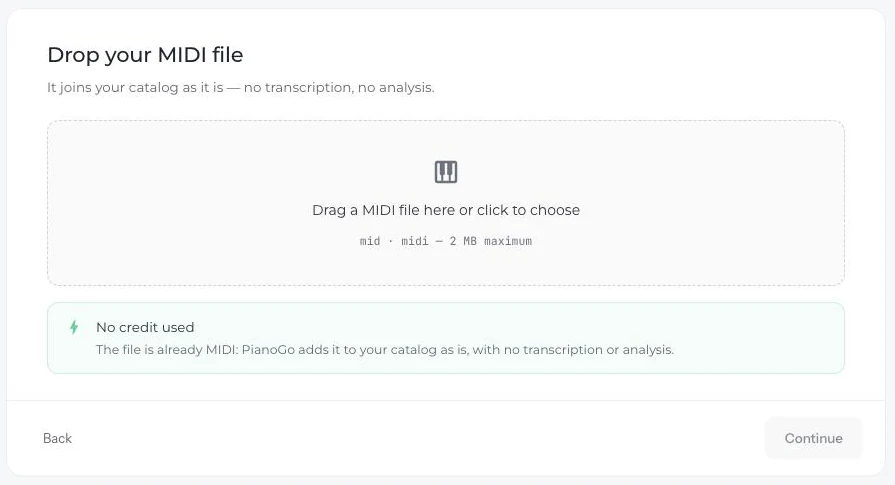
You can add a MIDI file to your PianoGo catalog, without credits and without a subscription. PianoGo adds it as is, with no transcription or analysis.
What is a MIDI file?
A MIDI file describes the notes of a song: it is not a sound recording. It is what lets PianoGo make the notes fall toward the keyboard.
How do I import it?
- Open PianoGo on the website, then the Import a song page.
- Choose the MIDI file source.
- Drag your file into the area provided, or click to choose it. Accepted formats: mid and midi, 2 MB maximum.
- Add the title and the composer, then certify that you hold the rights to the song.
- Click the Add to my catalog button.
The song then appears in your imported songs, with the original file kept.
What if the import fails?
- File too large: above 2 MB, choose a lighter MIDI.
- File rejected: PianoGo says it is not a valid MIDI.
- No notes detected: you can try again in arrangement mode.
What if I don't have a MIDI?
PianoGo can also transcribe a YouTube link, an audio or video file (mp3, wav, m4a, mp4, mov, 200 MB maximum) or your piano playing. A 30-second excerpt is free; a full song costs 1 credit. To find MIDI files: where to find MIDI files.
Was this article helpful?
In the same topic
Ready to try it?
Turn your songs into sheet music and MIDI files with the La Touche Musicale apps in the HUB.